Claude for Construction Estimating: How It Actually Works
Claude can take real work off an estimator’s plate, but the contractors getting burned are the ones who hand it the whole estimate. This is the workflow I run on live projects: three phases where I keep the understanding, the measuring and the final number, and Claude does the indexing, populating and cross-checking. It comes straight from the walkthrough below.
Key takeaways
- Claude is strong on grounded, repeatable work: indexing documents, extracting requirements, customizing your assembly library, populating the estimate and cross-checking scope.
- It should never read the drawings for you, measure quantities, or decide a rate. Those stay with you.
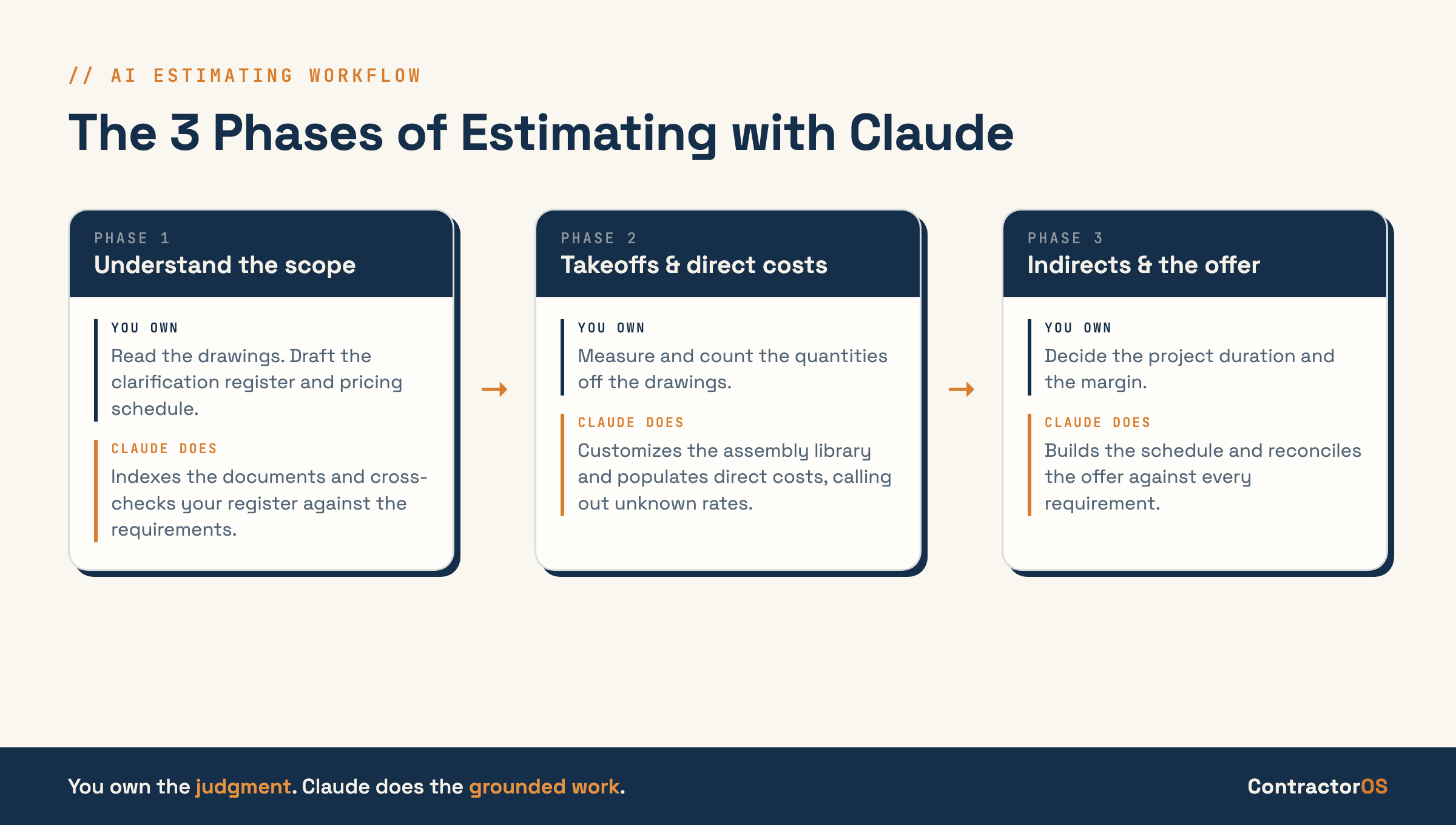
- The process runs in three phases: understand the scope, takeoffs and direct costs, then indirects and the letter of offer.
- The biggest trap is overusing it. The discipline is narrow, well-defined tasks built on project context you already understand.
What does Claude actually do in construction estimating?
Claude handles the grounded, repeatable parts of an estimate: indexing the tender documents, extracting requirements, customizing your assembly library from the drawings, populating the pricing template and cross-checking scope against your offer. It does not read the drawings to understand the job, measure quantities, or decide a rate. You keep that work.
You have probably heard the analogy that an AI model is like a room full of brilliant graduates. It falls short. These models have no common sense, they have amnesia, and they do not learn unless you explicitly tell them to remember something. There is a concept that explains why they fail at basic tasks: theory of mind, the ability to model what someone is actually trying to achieve rather than what they literally typed. People do this automatically. These models do not. They are next-token predictors that guess the most likely response to your question, which is why they can seem to lack common sense.
So the way to use Claude for estimating is to narrowly define what you want it to do, give it the background information it needs, define the process you want it to follow, and specify the output template. The only way you can do that well is to understand the project and the estimating process yourself. Use Claude for the heavy, time-consuming lifting while you stay in the driver’s seat.
The biggest mistake: overusing Claude on the estimate
The most common and costly mistake is over-relying on Claude for judgment it cannot do. On a battery project I gave it my full commissioning estimate, the project documents and my overall construction estimate, and asked it to check what was missing. It came back with around 50 recommendations, most of them already covered in the construction cost or built into my overheads. An estimator who understood the project would have known that instantly.
That is the trap. It is easy to get caught up in how smart these models seem and then hand them tasks they are not built for. They do not understand you, your project or your workflows. The fix is not a longer or cleverer prompt. The fix is discipline: define the task narrowly, give it the context, and only ask it to do things you can verify. You cannot delegate the understanding, and the moment you try, the estimate starts to drift.
Phase 1: Understand the scope yourself first
Phase 1 is mostly manual, and that is deliberate. Before any AI touches the project, spend a couple of hours reading the drawings, scope and specifications yourself. On a multimillion-dollar bid that time is cheap, and the understanding you build is what lets you steer Claude correctly on everything downstream. A summary is not understanding.
Here is the sequence I follow:
- Read the original documents yourself: the scope of works, the specifications, the drawings. Not an AI summary of them.
- Set up a Cowork project on the folder that holds the project documentation, so every chat can reach the same files and you can tell it to remember things as you go.
- Run the project-indexer. It turns the drawings and specs into a markdown context folder Claude can read quickly and accurately, and sets up a CLAUDE.md that pulls your business context (SOPs, production rate library, resource rates) from Notion.
- Draft your own clarification register and first-cut pricing schedule. The returnable schedule is the most important document in the estimate: it is how you break the scope down and how you present your price.
- Run requirements-extraction to cross-check your register and confirm the schedule covers the scope. AI is sweeping your work for gaps, not doing the work for you.
The output of Phase 1 is a list of clarifications for the client, a returnable schedule, and a clear structure to price against.
Phase 2: Takeoffs and direct costs (where AI never measures)
Phase 2 is where the trust boundary matters most. The slow part of a takeoff is not the measuring, it is setting up the assemblies. So I let Claude customize a standard assembly library to the project from the material specifications and text tags on the drawings, then I measure and count by hand. AI is not reliable at reading quantities off drawings, so that step stays human.
Keep a base assembly library for walls, concrete and earthworks with standard breakdowns and your own productivity rates built in. An assemblies skill reads your project context and the drawings, then customizes the standard assembly to the project-specific type, for example turning a generic blockwork wall into “wall type 3” with the right reinforcement and finishes. It is extracting specifications and tags, not counting anything.
From there:
- Import the customized assemblies into your takeoff software, then do the measurements manually.
- Export the takeoff as a CSV (your bill of quantities, labour, plant, materials and subcontract) and import it to Claude to populate the estimate’s direct costs.
- Make Claude call out any rate it does not recognize instead of inventing one. This is the single most important instruction in the whole workflow, because an invented rate is a silent error.
- For subcontractor quotes, use Claude for Excel to update the rates inside the workbook. It cannot see your CLAUDE.md, so keep an AI-instructions tab in the workbook that tells it where everything lives.
Here is the split that keeps the estimate honest:
| Human owns | Claude does |
|---|---|
| Reading the drawings to understand scope | Indexing and compressing the documents |
| The clarification register and pricing schedule first cut | Cross-checking both against the requirements |
| Measuring and counting quantities | Customizing the assembly list from specs and tags |
| Rate judgment on unknowns | Populating direct costs, calling out unknown rates |
| The submitted number | Reconciling the offer against requirements and estimate |
Phase 3: Indirect costs and the letter of offer
Phase 3 covers the costs that are not drawn on the plans. Indirect costs hang off the project duration, so estimate that first. For a self-performed crew you can work the duration out from total labour hours and a normal crew size. For a subcontract business a scheduling skill builds a duration from your historical task durations and sequence.
Direct costs are the physical construction work. Indirect costs are the cost of managing the project: the project manager, the construction manager, the recurring roles that run for the duration. Once you have a reasonable duration, you can allocate those recurring overheads properly instead of putting a flat percentage on top.
The final step is the letter of offer. Populate a standard template with your inclusions and exclusions, then check it against the requirements you found in Phase 1. Every requirement has to be either priced in the estimate or explicitly excluded in the offer. That is how you ground the submission so a scope gap cannot catch you out later. I finish with a reconciliation skill that checks the offer against the original requirements and the estimate one more time, so nothing the client asked for falls through.
Common mistakes to avoid
- Reading an AI summary instead of the original drawings and scope. The summary is fine to have. Relying on it is not.
- Letting AI measure or count quantities. Customizing assemblies is the safe part; measuring is not reliable yet.
- Letting Claude invent a rate it does not know. Make it call out unknowns so you can get a quote or make a deliberate assumption.
- Putting a flat percentage on indirects. They cascade off the directs and the duration, so estimate them.
- Skipping the reconciliation pass. The requirements-to-offer-to-estimate check is what closes the loop.
- Writing a longer prompt to rescue a bad answer. The fix is almost always more project understanding on your side, not more words in the prompt.
For the full walkthrough, including the Excel workbook and each skill running on a real project, watch the video above.
Frequently asked questions
Can Claude do a full construction estimate on its own?
No. Claude handles the grounded, repeatable parts: indexing documents, extracting requirements, customizing assemblies, populating the template and cross-checking scope. The understanding, the measuring and the final number stay with the estimator. Treating it as a full estimator is the most common and costly mistake.
Does Claude do the quantity takeoff and measuring?
No. Claude customizes your assembly library to the project by reading the material specifications and text tags on the drawings. The measuring and counting stay manual, because AI is not reliable at reading quantities off drawings. Customizing assemblies is the safe part; measuring is not.
Should I use Claude or Claude for Excel for estimating?
Both, for different jobs. A Cowork project handles the context-heavy work like indexing, requirements and populating direct costs, because it can pull your business context. Claude for Excel updates rates and quotes inside the workbook, guided by an AI-instructions tab, since it cannot see your project context files.
What is the biggest mistake when using AI for estimating?
Overusing it. On a battery project I asked Claude to check a commissioning estimate and it returned around 50 recommendations, most already covered elsewhere in the cost. Models have no common sense about your project, so they cannot own judgment. Narrow, well-defined tasks work; open-ended judgment does not.
Do I need to know estimating to use Claude for it?
Yes. The whole workflow depends on you understanding the project and the estimating process, so you can steer Claude, define each task and check its output. Claude does the heavy lifting on work you already know how to verify. It is an assistant to an estimator, not a replacement for one.
Where do the estimating skills come from?
The project-indexer, requirements-extraction, assemblies and reconciliation skills shown in the workflow are part of the ContractorOS skill library. You download and install them into Claude or ChatGPT and run the same process in your own business.
Want this working in your company?
ContractorOS members get the skills, templates and weekly live calls to implement it on real projects.
Join ContractorOS →